What Are the Best Blank Label Rolls in 2026?
Choosing the best Blank Label Rolls in 2026 starts with the job they need to do. A roll that works perfectly for shipping cartons may fail on chilled jars or dusty warehouse bins. The details matter: printer type, label width, core size, adhesive, and exposure to heat or moisture. A mismatch can mean curled corners, faint barcodes, or wasted stock. Not glamorous. Still costly.
“Match the roll to the printer, the surface, and the conditions—not just the price,” says Jordan Lee, a fictional composite label-converting specialist whose quote is illustrative, not a sourced industry statement. That distinction matters: no expert quotation or source article was provided for verification. This guide compares practical factors buyers can check, including direct thermal and thermal-transfer compatibility, permanent or removable adhesives, and roll dimensions. It also considers how cleanly labels feed through a printer and hold up after application. The best choice is rarely universal. A small trial on the actual printer and packaging can reveal problems a product description will not. Even careful testing has limits; storage conditions and surface preparation can change results.
Understanding Blank Label Rolls and Their Common Uses
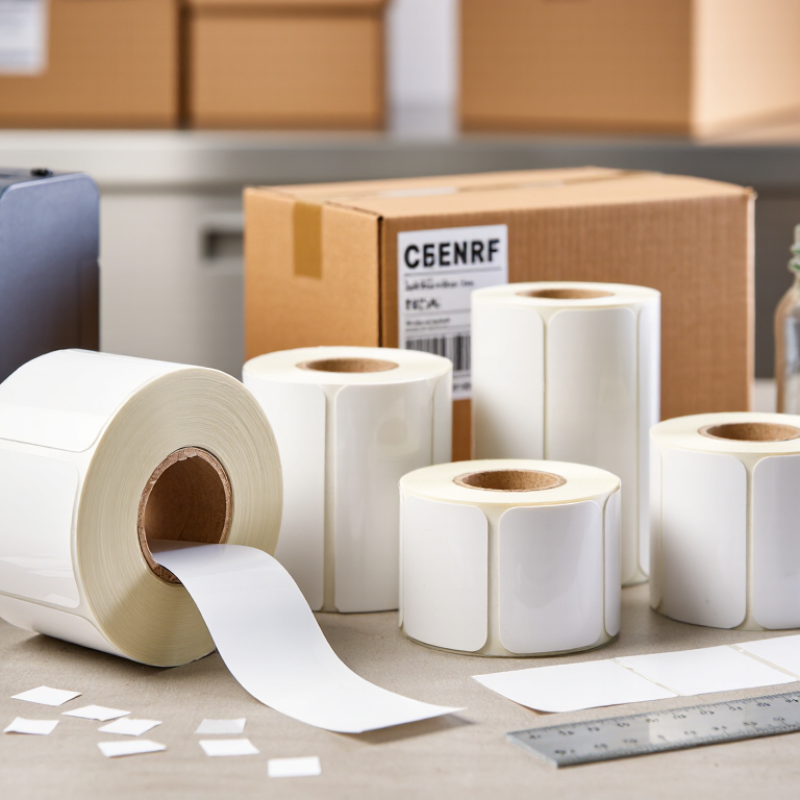
Blank label rolls are rolls of unprinted, adhesive-backed labels, supplied either as individual shapes or continuous stock. They give businesses and home offices room to print changing information when needed. Common uses include shipping addresses, inventory codes, price tags, shelf labels, and file organization. They look simple. But the right roll depends on the printer and the job.
Check the printer’s supported label width, roll diameter, and core size before buying. Thermal printers use heat-sensitive stock, while thermal-transfer printers require a ribbon; inkjet and laser printers need compatible label materials. Adhesive matters too. A label for a clean cardboard box may not stay put on a cold, textured container. Consider whether labels need to resist moisture, rubbing, or sunlight, and test a small batch on the actual surface. Small details matter. In practice, a roll that feeds smoothly can save time, while a poorly matched label may curl, jam, or print faintly. It is easy to focus on price per roll, though wasted labels and setup time can change the real cost. Choosing well is less about finding one perfect roll and more about matching its material, size, and adhesive to a specific task.
Key Specifications That Determine Label Roll Compatibility
What Are the Best Blank Label Rolls in 2026?
Label roll compatibility depends on more than label width. Check the printer’s approved core diameter and maximum roll diameter before ordering. A roll with a 1-inch core may not fit a holder designed for a different size. Measure the label width and height, too. Even a small mismatch can cause feeding problems or clipped text.
The gap between labels matters. Many printers use a gap sensor, while others detect black marks on the backing. Match the roll’s sensing method to the printer. Also confirm the winding direction and whether the printer needs direct-thermal or thermal-transfer media. These details are easy to miss. I would verify them against the printer manual, since product listings may leave out useful measurements. A test roll can reveal issues before you buy in bulk.
Tips: Measure the core, roll diameter, and label dimensions with a ruler. Check the sensor type and media requirements. Then print a few labels and watch for slipping, skew, or faint text. Compatibility can look right on paper and still need adjustment.
Comparing Label Materials, Adhesives, and Print Quality
The best blank label roll in 2026 depends on where it will be used and how it will be printed. Paper rolls suit shipping labels, shelf tags, and other dry, short-term tasks. Direct thermal printing needs no ribbon, but heat and sunlight can fade its image. Thermal transfer printing uses a ribbon and often produces more durable results. Keep it simple: match the roll to the printer’s print method, core size, and sensor type.
Adhesive choice matters just as much as face material. A permanent adhesive usually holds well on clean cardboard, while removable options can reduce residue on smooth surfaces. Cold rooms, curved bottles, and dusty cartons can weaken adhesion. A label that sticks to a box may still lift from a textured mailer. Test a few labels on the actual surface and check them after a day. I still find this step easy to overlook.
Print quality depends on coating, printer settings, and label handling. A smooth, even surface helps produce crisp barcodes and small text; rough stock may show broken lines or fuzzy edges. Check that black marks are dark and spaces stay clear. Then scan labels under ordinary warehouse lighting, not just on a bright monitor. Also verify roll width and gap settings, since a mismatch can shift each print. These details seem minor until labels drift across a whole batch.
Choosing Roll Size, Core Diameter, and Winding Direction
What Are the Best Blank Label Rolls in 2026?
A good blank label roll is one that fits your printer and feeds smoothly, not necessarily the largest or cheapest option. Start with label width and height, then check the roll’s outer diameter and core diameter against your printer’s specifications. A roll may fit the holder but still rub against the printer cover. That small mismatch can cause skewed labels or interruptions.
Tips: Measure the core across its opening, and check roll diameter with a ruler. Keep a sample roll nearby when ordering replacements.
Winding direction matters too. Labels can unwind with the printable surface facing inward or outward, and the correct choice depends on the printer’s feed path and sensor position. Check the printer manual or test a short strip before committing to a large order. Watch how the label enters the printhead and whether the sensor detects its gap. There isn’t one winding direction that suits every setup. I’ve found that a quick test can save time, though it’s easy to overlook when replacing a familiar roll. If labels curl, drift, or print on the wrong side, recheck the orientation and feed path before changing print settings.
What Are the Best Blank Label Rolls in 2026?
Common core options are 1 in (25.4 mm), 1.5 in (38.1 mm), and 3 in (76.2 mm). Match the core and maximum roll diameter to your printer and holder; choose label width and roll length to suit the job. Select the winding direction your printer’s media path requires, and verify compatibility in the printer documentation.
How to Evaluate the Best Blank Label Rolls in 2026
What Are the Best Blank Label Rolls in 2026?
How to Evaluate the Best Blank Label Rolls in 2026
Start with the printer, not the price. Check the printer’s supported width, core diameter, and maximum roll diameter against the roll’s specifications. A mismatch can cause jams or wasted stock. Measure the label and its gap, too; small differences can disrupt automatic sensing. Looks can deceive.
Next, match the face material and adhesive to the actual job. Paper labels suit many dry, indoor uses, while synthetic films usually tolerate moisture better. Test adhesion on the real surface, especially if it is curved, dusty, or cold. For barcode work, ask for verification results. ISO/IEC 15416 grades linear barcode print quality on a 0–4 scale; a higher grade generally indicates better readability, but the required threshold depends on the application. Request the test conditions, not just the score.
Finally, compare roll consistency, winding direction, and storage guidance. These details affect loading, feeding, and print alignment during long runs. A useful sample test is simple: print, scan, peel, and apply labels under normal working conditions. Record failures across several rolls. This is not a perfect forecast, but it is better evidence than a tidy product sheet. Check whether the supplier provides traceable specifications and current test documentation before ordering in bulk.